5 Common Business Writing Woes Free AI Editors Can Resolve

With the right free AI editors, you can sort your gibberish into everyday English. Or the tools could inspire you to find the right terms.

In this list, I left out ProWritingAid, copy.ai, and similar tools, which are better writers.

Also not included:

  • Stand-alone browser extensions or smartphone apps
  • Those that offer trials–these cost nothing, but most of them have limits

A few of them might be unavailable outside the U.S. without access through a virtual private network (VPN).

Remember: Don’t rely on free AI editors alone, especially in your first-round editing, because they’re error-prone (like us). They’re not the rake that catches every mistake. 🙂

1. Long words and sentences – They’re often harder to read. Many generative AI writing apps don’t focus on readability. By default, some, like ChatGPT, write at a high school level. If you’ve used Microsoft Word, you’re probably familiar with Flesch-Kincaid reading levels, which measure how understandable writing is at certain education or grade levels.

Solutions: 

2. Incorrect usage – Typos and poor grammar have littered many rough drafts. Sometimes, you’ve spelled the word right but have used it in the wrong context. The “eyes” of AI can spot these and more errors. Beyond spell-check, Grammarly flags grammar failures and suggests better wording. Its open-source cousin, LanguageTool, does the same and can also paraphrase passages.

Solutions: Grammarly; LanguageTool 

3. Abstract terms  Vague words and phrases like “providing solutions” don’t hook readers. Concrete terms are more likely to paint pictures in readers’ minds. If you can’t create images with words, use AI to sketch details. 


Solutions: ChatGPT or Claude via prompts; Wordtune

Example:

A financial advisor’s solution, which may also work as a unique selling proposition (USP): helping entry-level workers manage their money better to save for retirement.

4. Businessese – This formal language businesspeople sometimes speak reeks of jargon and self-importance. The right editing tools turn this gibberish into everyday English. Given some AI apps’ tendencies to write formally, you’ll likely need to ask them to simplify the wording, do it yourself, or use the following tools.

Solutions: Grammarly, The Hemingway App, Ludwig.guru, Wordtune

Grammarly also measures tone. The Hemingway App shows you where to shorten and clarify sections. For phrases that don’t seem to fit, Ludwig spotlights examples of common usage.

5. Blandness – If your content is as exciting as yacht rock, AI editors can add analogies, examples, facts, quotes, or statistics instantly. Use these ingredients sparingly. And remember to check your sources, because AI sometimes fudges details. Try these apps to add spice to entice readers.

Solutions: Wordtune; ChatGPT, Claude, or Bing Compose via prompts

Want to boost your editing skills beyond the basics? A coach with business writing experience can steer you to the right words, with or without AI.

BOOK A FREE COACHING CONSULTATION

Do you use AI to edit and proofread? If so, what’s your “go-to” software? Feel free to comment below.

Quotes

“#1 best practice for editors using AI: you MUST fact-check any AI-generated content for plagiarism, falsehoods, outdated information, biased information, and made-up information.” ~ Dragonfly Editorial

  • Published: October 3, 2023
  • Last updated: November 24, 2023

5 Do-It-Yourself Proofreading Hacks for Business Communication

1. Know your weaknesses – Do you tend to write long sentences, repeat certain words, or have other verbal tics? Being aware of your bad habits can help you focus on what to cut in a pinch. For example, you can search your copy for repeated words or phrases and replace them with appropriate synonyms to improve the flow.

2. Change the font size or color – This is one of the most effective proofreading hacks — it truly helps you see your copy differently. Errors seem to pop out more, especially after I get used to reading the same text over and over. Just remember to change it back to normal later, if necessary. 🙂

3. Remember readability – Microsoft Word and similar software use the Flesch-Kincaid readability scale to score your writing by grade level. Grade eight or nine is common for easy reading, but some grammar experts suggest you aim for a sixth-grade level. The Hemingway App follows an algorithm. To improve readability, use few, if any, words with three syllables or more. And shorten your sentences.

Example: Individual (five syllables: in/di/vid/u/al)
Revised: Person (two syllables: per/son)

4. Use a checklist – Grammar and style books sometimes have lists of common errors at the back, which can be especially helpful for new writers. This is among the proofreading hacks that are best to save for last. My newsletters also offer some usage tips.

5. Keep it in context – Does everything make sense? Does it add up? Names and numbers can be easy to gloss over. Even if every statement is correct, your wording could confuse readers. This is a sometimes overlooked part of making your writing easy to understand.

What are some of your favorite proofreading shortcuts? Feel free to comment below.

Need help with your editing or proofreading? Contact me.


Quotes

“Let the reader find that he cannot afford to omit any line of your writing because you have omitted every word he can spare.” ~ Ralph Waldo Emerson

“Write without fear. Edit without Mercy.” ~ Unknown

5 Ways to Say More With Less in Your Business Writing

Ever slogged through a sentence like this — when you could say more with less?

“We’re writing to let you know that we’ve made several important updates regarding the current policies in effect, which we believe will make a difference going forward.”
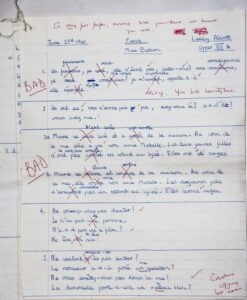
A handwritten French assignment with red ink corrections and critical comments like "BAD" and "Careless copying." A note says, “A very poor paper, showing that you have not learnt your work.”

It’s like swimming through molasses. Clear writing (and decent editing) cuts the drag.

The secret to finding the sweet spot?

Balance brevity and clarity: use enough words so readers get the full meaning. Don’t meet them halfway through run-on sentences or fragments; sometimes a few extra words give them the context they need to prevent confusion.

❌ Because regulatory approval is still pending.
✅ We delayed the product launch because we’re still awaiting regulatory approval.

Work harder so your readers don’t have to. Pretend you’re editing a movie: if it doesn’t move the plot forward, it hits the cutting room floor.

How to Say More With Less

1. Cut the qualifiers – “Very,” “really,” and other qualifiers can bloat your writing. Remove them to say more with less.

Example: “We’re really excited about our new product.”
Revised: “We’re excited about our new product.”

(Or better yet, show why.)

Bonus tip: Scan your drafts for these fillers and ask, “Does the sentence lose meaning without it?” If not, leave it out. Or as William Strunk, Jr. and E.B. White said in “The Elements of Style,” let every word “tell.” Don’t use two words when one will do.

2. Watch your adverbs – These words usually end in “-ly.” Use adverbs sparingly, only when you need to make a point. They’re usually a sign you should trim the fat because your verb isn’t working hard enough. Instead, try a stronger one.

Example: “The car rolled down the driveway slowly.”
Revised: “The car crawled down the driveway.”

One word > three.
More meaning, less mess.

3. Adjective objectivity – Not all descriptors are bad, but many are unnecessary. Often, you don’t need them unless they’re relevant to your subject matter.

Example: “Made of high quality steel, these knives are tough enough to slice tin cans.”
Revised: “Made of quality steel, these knives slice tin cans easily.”

Another example: Our innovative, groundbreaking, world-class solution improves workflow.

What does “world-class” add that “improves workflow” doesn’t already imply? Can you show the result instead — like “cuts busywork by 50 percent”?

Keep what matters. Cut the rest.

4. Save on specifics – Sometimes less detail = more clarity. Your readers want the takeaway, not the entire backstory. Move from the specific to the general:

Example: “We toured every split-level between 3rd and Pine before settling on our fixer-upper.”
Revised: “We toured dozens of homes before choosing our fixer-upper.”

Need to give more context? Instead of writing a description or explanation, link to more information or add a visual. You don’t have to cram every fact into one sentence.

5. Think visual appeal – You can also say more with less by changing how your words appear. Help readers see the point.

  • Highlight key points; use bold sparingly
  • Chunk information blocks into two columns
  • Turn a long paragraph into a tidy list
  • Consider a chart or infographic when things get complex — and attract attention

Bust the wall of text to give their brains a rest — and their eyes a place to land.

Great writing doesn’t stop at fewer words. It aims for the right ones to make a point. It’s “He moved quickly” vs. “He dashed.” One word = more impact.

Word choice, not word count, matters the most.

When you hit “delete” on that clever metaphor you spent ten minutes crafting, it can hurt (been there, done that!). To soothe the pain, know your readers will see the meaning clearly without the clouds — and your words hold more weight.

And if you’re unsure, a second set of eyes can help you prune your words for stronger phrasing.

What are some of your favorite ways to say more with less? Feel free to comment below.

QUOTES

“I would have written a shorter letter, but I did not have the time.” ~ Blaise Pascal

“The poem is a form of texting…it’s the original text. It’s a perfecting of a feeling in language — it’s a way of saying more with less, just as texting is.” ~ Carol Ann Duffy

5 Useless Words and Phrases to Cut From Your Business Writing

1. are able to

Example: We are able to wash dishes, mow lawns, or do any of your other household tasks.
Revised: We can wash dishes, mow lawns, or do any of your other household tasks.

When you cut these useless words, you avoid using a “to be” verb (“are”) and a preposition (“to”). They bloat your writing. Use them only when they’re absolutely necessary.

2. as well as

Example: The U.S. Department of Agriculture’s MyPlate nutrition guide includes grains, vegetables, and fruit, as well as protein.
Revised: The U.S. Department of Agriculture’s MyPlate nutrition guide includes grains, vegetables, fruit, and protein.

People tend to use “as well as” in favor of “too” or “also,” especially if they’ve already used them, as a way to vary their word choices. They’re good alternatives, but you can also insert an “and” every now and then for better variety.

3. along with

Example: High winds and frigid temperatures, along with snow and ice, make for hazardous winter driving conditions.
Revised: High winds, frigid temperatures, and snow and ice create hazardous winter driving conditions.

Replace these useless words with plain old “and.”

4. there are/there is

Example: There are several action movies released during the summer.
Revised: Several action movies are released during the summer.

In many cases, you can trim these seemingly harmless phrases entirely.

5. in order to

Example: In order to finish processing your purchase, we need your payment information.
Revised: To finish processing your purchase, we need your payment information.

Trim the first few words to the essential: “to.”

Read more about cutting Filler Words in Your Speech at Ivypanda.

Quotes

“The best sentence? The shortest.” ~ Anatole France

“If it is possible to cut a word out, always cut it out.” ~ George Orwell