

An attention-grabbing professional newsletter format goes beyond words. It reflects your image and holds interest effectively, building brand recognition and results.
If you struggle with writing and design, the Easy Five-Step Business E-Newsletter Template‘s clear structure guides you to create polished, eye-catching newsletters quickly.
4 Rules for an Engaging Professional Newsletter Design
- Tailor and Format Your Content to Reach Your Goals
Focus on audience needs and interests
- Keep the Design Simple, Scannable, and Responsive
(with a clear structure and calls-to-action)
- Repurpose Content
from social media, blog posts, or elsewhere
- Enhance Visual Appeal
Add backlinks, key takeaways, and enticing images and other elements
Especially for shorter content (500 words or fewer), as Fenwick suggests, a single-column layout eases reading and creation. Responsive design aids a seamless, user-friendly experience across devices, including smartphones. Optimize the layout, content hierarchy, and calls to action.
Well-designed newsletters enhance readability and brand recognition, boosting open and click-through rates.
Test different designs to see what clicks with your audience. For accessibility, structure headings and content logically, offer descriptive “alt text” for images and hyperlinks, and ensure enough color contrast. Indiegraf offers some helpful newsletter design best practices.
3 Key Elements of a Professional Newsletter Format
1. The Header: The top section with your branding.
2. The Body: Your main article, featured sections, and a call to action.
3. The Footer: A CAN-SPAM, CASL, or GDPR-compliant ending.
They can be adapted to different industries or business types.
Once you’ve decided on the basic layout and content, you can tackle writing a newsletter for business. Knowing how to write a newsletter article for business also enriches your content.
What is a Free Professional Newsletter Format?
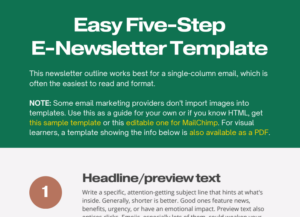
Free and paid email marketing platforms (ESPs) offer professional newsletter templates.
Regardless of your skills, their templates let you add text, links, and images to suit your taste. Many also let you choose industry-specific designs.
Assembling an attractive newsletter can be time-consuming. ESPs might not guide you step-by-step or show where to place the content to catch eyes. But as you learn, the process becomes easier.
Even with a template, it’s not always clear where to put the content. If you waste time guessing, the Easy 5-Step Business E-Newsletter Template shows you what to add and where.
2 High-Performing Professional Newsletter Examples: Financial Brands
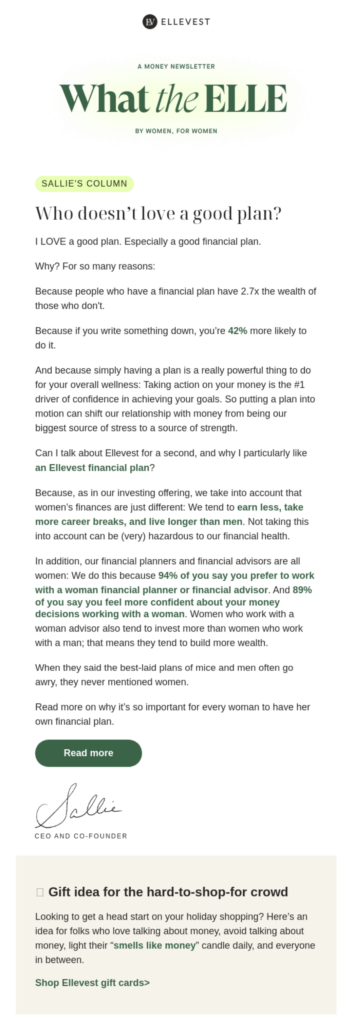
Ellevest’s What the Elle? Money Newsletter :”For Women, by Women”
- Focus area: financial planning for women
- Target market: women who lack good financial plans
- Unique value proposition: “Wealth management and financial planning for women, families, and the next generation — from the experts in women’s wealth.”
In my experience, responsive, single-column designs — like Ellevest’s — boost brand recognition and click-through rates.
The short headlines draw readers in, starting with the warm welcome note that subtly highlights Ellevest’s financial plans.
The footer includes industry-appropriate disclaimers and complies with CAN-SPAM rules. It also reinforces trust, as does the company’s SEC designation.
The soothing earth tones augment the text.
The CTAs, links, and requests for replies encourage clicks while letting Ellevest learn more about its readers.
Suggestions for improvement:
- Ellevest could add stronger CTAs near the top and bottom, with more descriptive text like “Learn why a financial plan helps every woman build wealth.”
- “Yes” or “no” questions aren’t always effective in CTAs. The bottom CTA lead-in copy could make a shorter statement.
“What the Elle?” contains the essentials of a lead-converting e-newsletter tailored to audience interests and pain points.
“Professional services firms can write e-newsletters faster using templates and content calendars. For example, pre-designed templates streamline the layout process, while content calendars ensure timely and relevant topics are covered. This structured approach allows firms to focus on crafting compelling messages rather than formatting.
By consistently delivering valuable insights and industry updates, firms can engage clients effectively and demonstrate expertise. This efficiency not only saves time but also helps in building stronger client relationships and attracting new business through consistent communication.”
- Focus area: fintech for financial providers
- Target market: financial service providers
- Unique value proposition: the bank behind the scenes
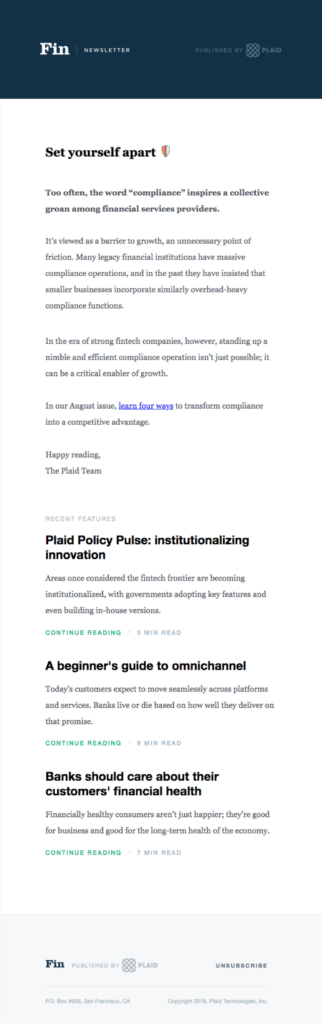
The Fin newsletter exemplifies a captivating design. With minimal elements like the header and bold headings, every statement stands out. Though it’s sent by Plaid, no colors clash. The dark blue header bar conveys cool professionalism and trust.
A single concept works throughout: one column, one header, an article, one CTA, and one footer. The CTA rhymes (a favorite technique of mine). It echoes the subject line effectively. The bottom trio of links adds interest, while the simple footer design is appealing.
Fin could add contact and social media icons to the top and bottom for more click-throughs. More details about their expertise could also boost their credibility.
This e-newsletter shows how a little clear content goes a long way in keeping readers focused and informed.
The Essentials of a Professional Newsletter Design
An effective newsletter structure guides readers. Combined with clear writing and design, it forms an eye-catching e-newsletter.
Knowing how to create a professional email newsletter or how to write a law firm newsletter can enhance your emails. It’s all part of learning how to make a newsletter look professional.
To see my newsletter, subscribe below. Plus, you’ll get a gift — the Easy 5-Step Business E-Newsletter Template.
- Date Published: June 12, 2024
- Last Updated: December 1, 2025
